This website is currently Under Construction. It will eventually host a few of my projects and other random thoughts and ideas. I'll be adding more things when I have some time. Nothing really of any interest. Don't bother checking back, I'm sure you'll have much better things to do. In fact, you probably should be doing something else right now...get to it!
Welcome!
Manorville Hills Trail Map
Manorville Hills County Park is a newly established Suffolk County park in one of the largest expanses of open space left on Long Island in the heart of the Central Pine Barrens Core Preservation Area. The trailhead is located off of County Road 111 in Manorville (just south/east of the intersection with Halsey Manor Road). The 125-mile Paumanok Path crosses through the park along with a new 7 mile hiking trail loop, a 13 mile mountain bike loop and a horse trail, along with plenty of unmarked trails and old woods roads. Click through to download high-quality trail maps of the western portion of Manorville Hills.
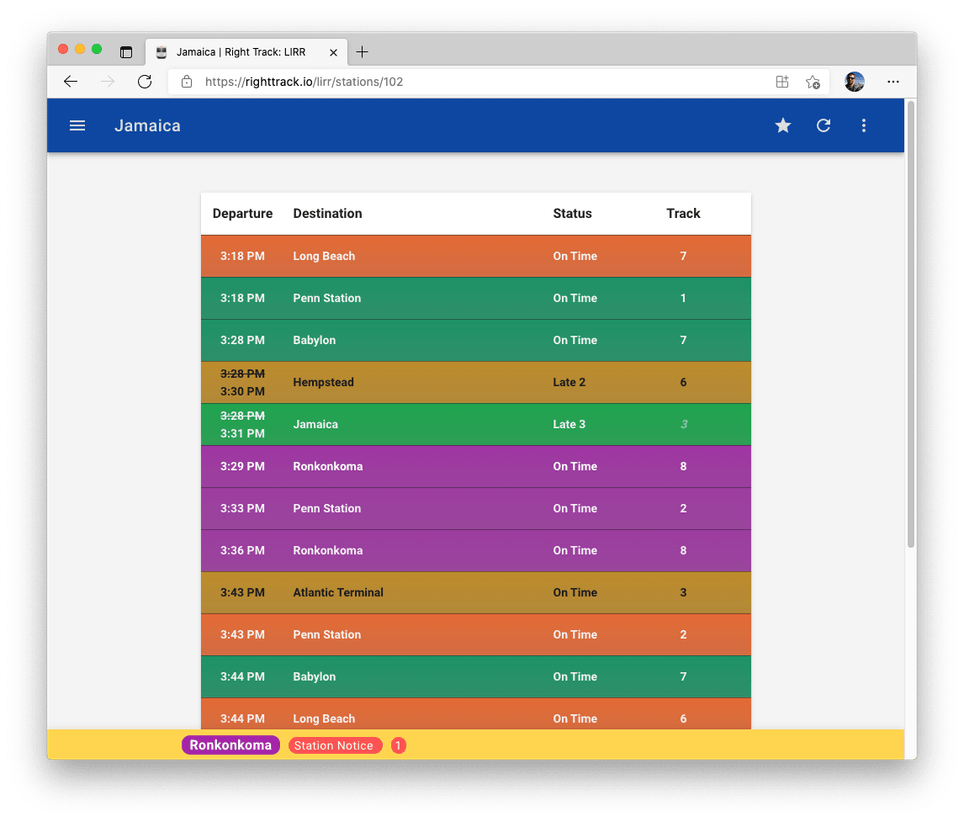
Right Track: Metro North
Right Track: Metro North is an Android app that provides quick and easy access to Metro North schedule information and real time status updates. The included schedule database gives you departure, arrival and travel times between stations along Metro North's East-of-Hudson lines (Hudson, Harlem and New Haven lines and branches), with no internet connection required! The app also integrates Metro North's Train Time (TM) status and track information directly into the trip schedules when an internet connection is available (except for the Waterbury and Danbury branches and NH-State St station, which do not have Train Time information available to them). You can also view a station's Train Time table directly within the app, giving you the upcoming departures from the station with status information and track numbers. Also included is an easy to read line map for Metro North and the MTA Service Status information, giving you up to the minute status information for all MTA Transit Services, including NYC Subways and Buses!
Remember the Milk CLI - UPDATED
The Remember the Milk Command Line Interface has been updated to version 1.2.0. This version adds the ability to add
and delete notes from tasks. Use the commands rtm addNote [task index] [note title] [note body] to add a note to the specified
task and rtm delNote [task index] to delete one or more notes from the specified task.
Remember the Milk CLI - Suggestions
Call for Suggestions:
I would like to improve the way recurring tasks are handled and displayed by the script. However, I don't really use recurring tasks all that often so I'm not quite sure of the best way to handle them. That's why I'm asking all of you out there to offer up some suggestions on how you would like to see recurring tasks handled. Feel free to leave a comment on the website or send me an email with your ideas. Thanks!
RTM CLI - Now on Bitbucket
The Remember the Milk Command Line Interface is now hosted on bitbucket. You can now download the latest versions from here and if you're interested in helping out with the project (bug fixes, adding new features, etc), just let me know!
New Web Host!
I've finally taken the plunge and have gotten an actual domain and have finished migrating the site to a real web host! You can now find the site at http://www.davidwaring.net/ and it should be up more than 80% of the time (those free web hosts do have their costs...). All previous facebook comments seemed to have been lost in the ether, and will most likely remain that way as I finish migrating to a more robust system.
Mac OS X Backup Utility
This project started out as a simple shell script wrapper for rsync. rsync is a great tool for performing backups since it will sync all files from a source location to a destination directory while keeping most of their privileges and extended attributes intact. The most convenient feature of rsync is that after the first backup, it will only sync the files that have changed, greatly reducing the amount of time required to perform a backup. This program was originally written to perform a backup of my laptop's internal hard drive to an external drive with the ability to "bless" the backup to make it bootable. The project has expanded from just a shell script to include a GUI wrapper for the shell script that can handle multiple backup configurations.
Remember the Milk CLI
Remember the Milk is a superb and popular task-management web-app. It has a lot of great features and excellent integration with some third-party services (such as Gmail and Google Calendar, Twitter, IM, SMS and smartphone apps). However, I wanted an easy to use command line program that would make displaying and managing my task list even that much quicker and easier. This project aims at creating a full python-based command-line interface for Remember the Milk using the official API.